How We Automated Tax Prep End-to-End with Claude Code and REST APIs
 Tofique Elder · Controller at Masterworks · 6 min read
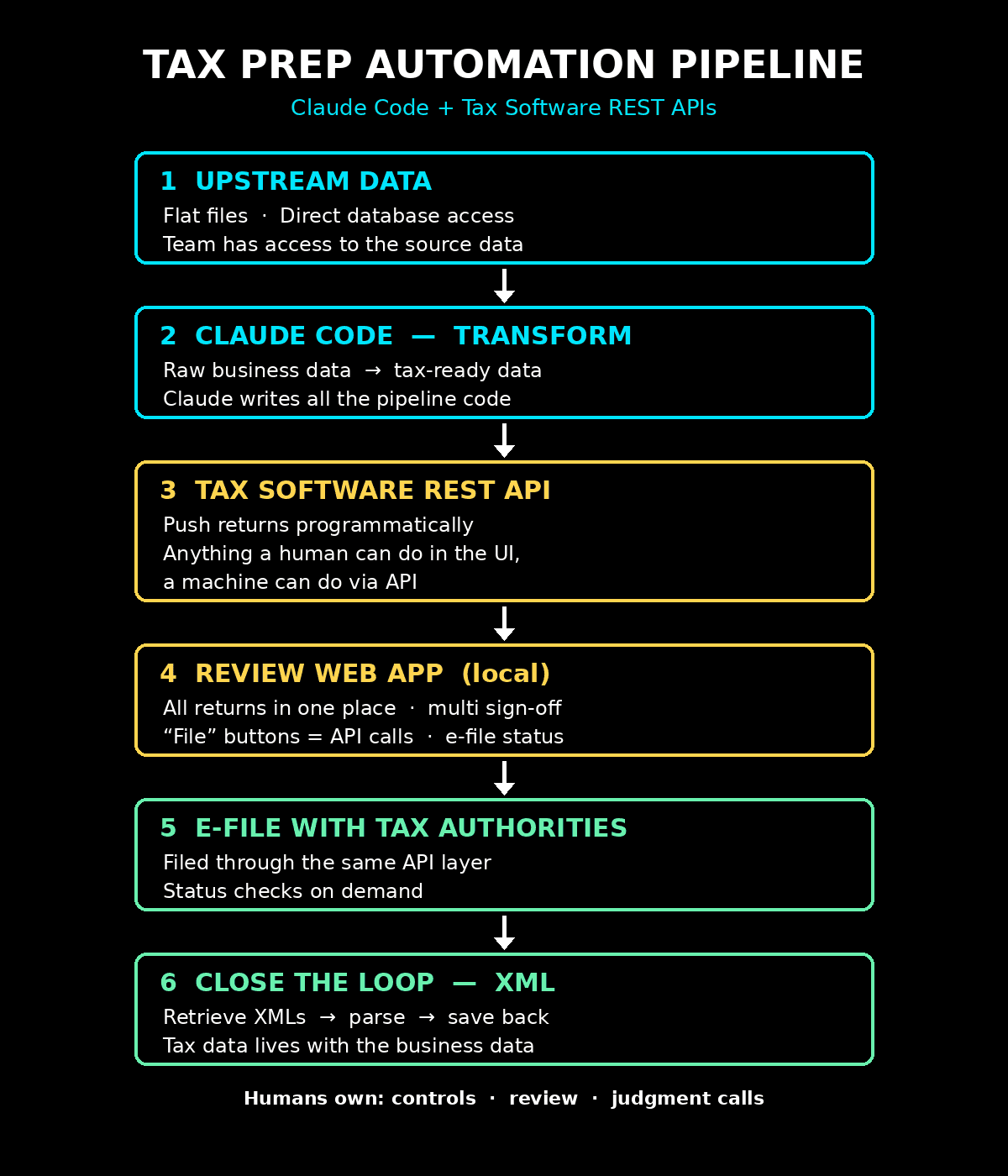
I've posted a lot on LinkedIn about our tax prep automation, and the most common question I get back is the how. A post there can only scratch the surface, so here's the full answer — the tools, the architecture, the code pattern, and the parts that still belong to humans.
I've been preparing tax returns for over 10 years. This is the first year the work looked fundamentally different.
The tools
We use Claude Code — terminal or Desktop, whichever you're comfortable with. We're on the Enterprise plan, and that matters: data protection and privacy are non-negotiable when you're working with tax data.
Claude Code does all the heavy lifting — the coding, the programming, the technical work. Our tax team doesn't need to be engineers. We need to know what we want built and how to direct it. That's a very different skill than writing Python from scratch, and it's one tax professionals already have more of than they think: we're trained to specify requirements precisely, document our logic, and review outputs skeptically.
The data
Our tax team has access to the necessary upstream data — either via flat files or direct database access. This is the foundation. If your team can't reach the source data, start there before anything else.
The powerful part: we use Claude to harness all that raw data and transform it into tax-ready data. Trial balances, transaction detail, investor allocations — whatever the return needs, transformed programmatically instead of by hand. Every transformation is code, which means it's repeatable, reviewable, and version-controlled, not a chain of undocumented Excel steps that lives in one person's head.
The unlock: tax software with real APIs
Here's what made all of this possible. Our Thomson Reuters tax software has REST API access with really, really good documentation.
And here's the mental model shift that changes everything:
Almost anything you can do as a human inside the software can also be replicated and done by a machine through the API. Almost everything.
Data entry. Return creation. E-filing. Status checks. Retrieving the filed return. Once you internalize that, the software stops being a place where people type and becomes an endpoint in a pipeline.
At that point you have all your "ingredients," and you can prepare taxes in a programmatic way:
- Upstream data — flat files or database access
- Claude Code — transforms raw data into tax-ready data
- Tax software REST API — pushes returns into the system
- Review layer — humans verify, adjust, and sign off
- E-file via API — the same buttons, now programmatic
- XML round-trip — filed data flows back into our platform
What the code actually looks like
This is an illustrative, simplified version of the pattern — endpoints and field names are fake, but the shape is real. Claude Code wrote this kind of code; we directed it and reviewed it.
# Illustrative example — endpoints & fields simplified
import requests

BASE = "https://api.taxsoftware.example.com/v1"
HEADERS = {"Authorization": f"Bearer {get_token()}"}

def build_return(entity):
    """Transform upstream data into a tax-ready payload."""
    tb = load_trial_balance(entity)          # flat file or DB
    k1_data = allocate_partner_items(tb)     # allocation logic
    return {
        "entityId": entity.id,
        "taxYear": 2025,
        "scheduleK": map_to_k(tb),
        "partners": k1_data,
    }

def file_return(payload):
    """Push the return, e-file it, confirm status."""
    r = requests.post(f"{BASE}/returns", json=payload,
                      headers=HEADERS)
    return_id = r.json()["returnId"]

    requests.post(f"{BASE}/returns/{return_id}/efile",
                  headers=HEADERS)

    status = requests.get(
        f"{BASE}/returns/{return_id}/efile/status",
        headers=HEADERS).json()
    return return_id, status["state"]   # -> "ACCEPTED"

# Close the loop: pull the XML back into our platform
def archive_return(return_id):
    xml = requests.get(f"{BASE}/returns/{return_id}/xml",
                       headers=HEADERS).text
    save_to_internal_platform(parse_return_xml(xml))
If you've read the earlier posts on this site about APIs, none of this should look intimidating. It's requests.post and requests.get with an auth header. The complexity isn't in the code — it's in knowing what a correct return looks like. That part is still us.
The review layer — where it gets game-changing
Getting data into the system is only half the job. We still need to review everything and make updates. Same approach: we had Claude build the extraction tooling, and because we control the extracted data, we can render it in any way, shape, or form we want in order to review it and get comfortable with it.
That's the quiet superpower nobody talks about. Tax software shows you data the way the vendor decided to show it. When you control the extraction, you decide what a review screen looks like.
This year that turned into something I'm genuinely proud of: our team literally built a local web app to review all the tax returns in one place. Inside the app:
- Every return, side by side, in a single review interface
- Multiple sign-offs implemented directly into the workflow — real controls, not a checklist in a spreadsheet
- Buttons that filed the returns with the tax authorities — underneath, those buttons are just API calls
- E-file status checks, on demand, in the same place
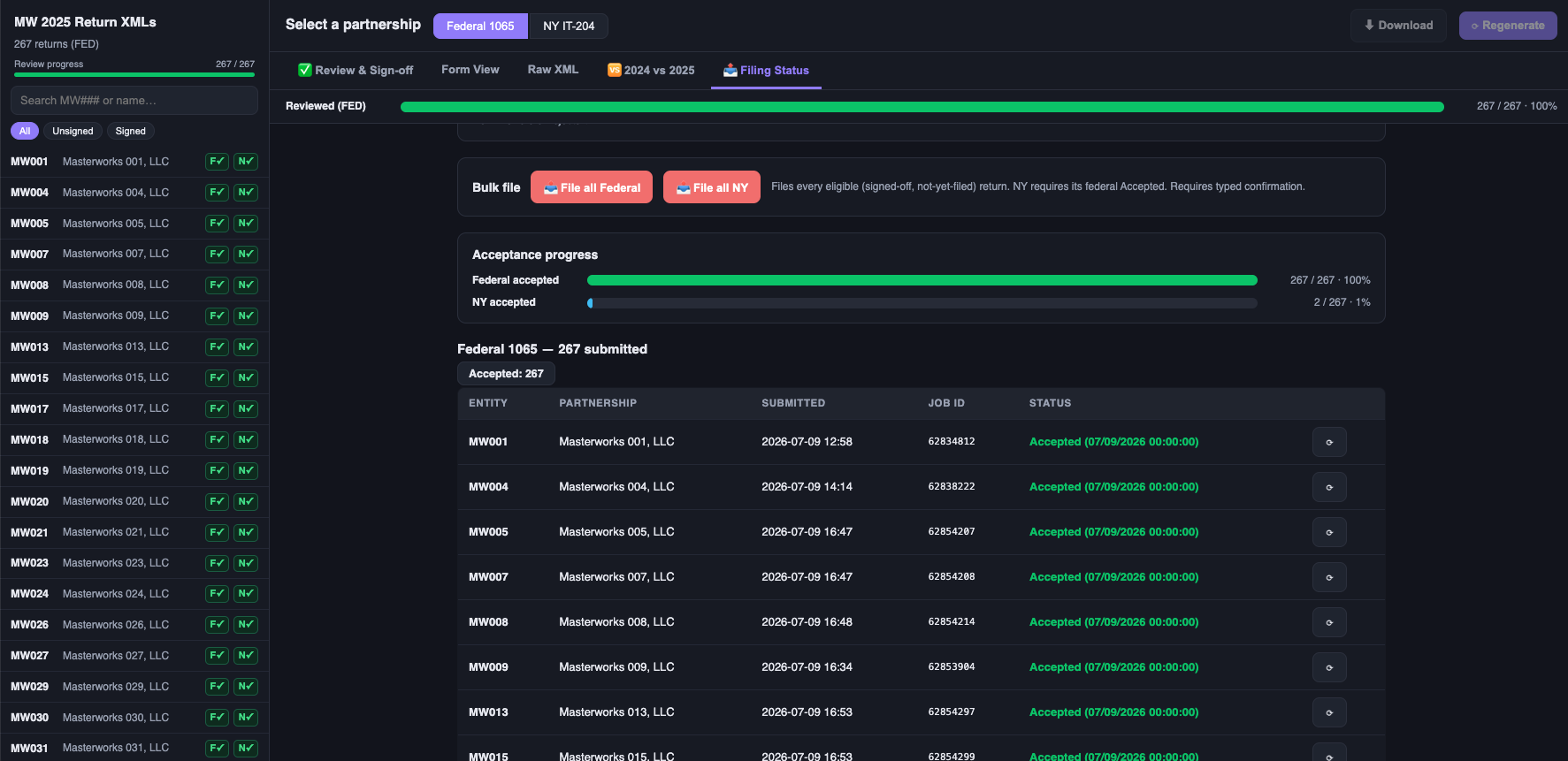
And yes, it's in dark mode. A decade of late-night busy seasons — the midnight-oil PTSD is real — had us build that in on pure instinct. The punchline: we never needed it. There were no late nights this time around.
A dynamic review process, designed by the people doing the reviewing. Preparers and reviewers shaped the tool around how they actually work, instead of contorting their work around the software.
Closing the loop: the XML round-trip
This is the part most teams skip, and it might be my favorite.
After filing, we retrieve the XMLs from the tax software through the API, extract and parse out the data, and save it back into our internal systems. All of the tax data now lives in our Masterworks platform, alongside the rest of our business data — not stranded inside a tax application or scattered across PDF copies.
Why that matters: next year's prep starts from structured data. Investor questions get answered with queries, not archaeology. Tax stops being a disconnected annual event and becomes another dataset in the platform.
What went wrong (and what we'd tell you before you start)
In the spirit of this site — the honest parts:
- The API docs are the product. The single biggest reason this worked is that our tax software's API documentation is genuinely excellent. Before you commit to this approach, read your vendor's API docs like you'd read a contract. If they're thin, your pipeline will be a fight.
- "Almost everything" means almost. A handful of workflows still required a human in the software. Design for that instead of pretending it away.
- Garbage upstream data doesn't get better by moving faster. The pipeline exposed data quality issues immediately and loudly. That's a feature, but budget time for it.
- Controls got more important, not less. Higher throughput means an error can propagate faster. The multi-sign-off design in our review app wasn't decoration — it was the price of admission.
Where the value is going
All of this was made possible by two things: Claude Code doing the technical programming work, and tax software with robust, well-documented APIs.
But tools alone don't get you there. It requires creativity, innovation, and thinking outside the box from us as humans. It still requires good controls, a real review process, and judgment calls — arguably more than before.
That's where the value is changing, at least from my perspective after a decade of preparing returns. The value was never in the data entry. It's in designing the system, catching what the machine can't, and standing behind the numbers.
If you're a tax professional reading this and thinking "my team could never" — your team absolutely could. The ingredients list is short: access to your data, software with APIs, and an AI agent that writes the code. The rest is the same professional judgment you already have.