Agentic workflows: a case in automating end-to-end lease accounting
 Francisco Meyo · 11 min read
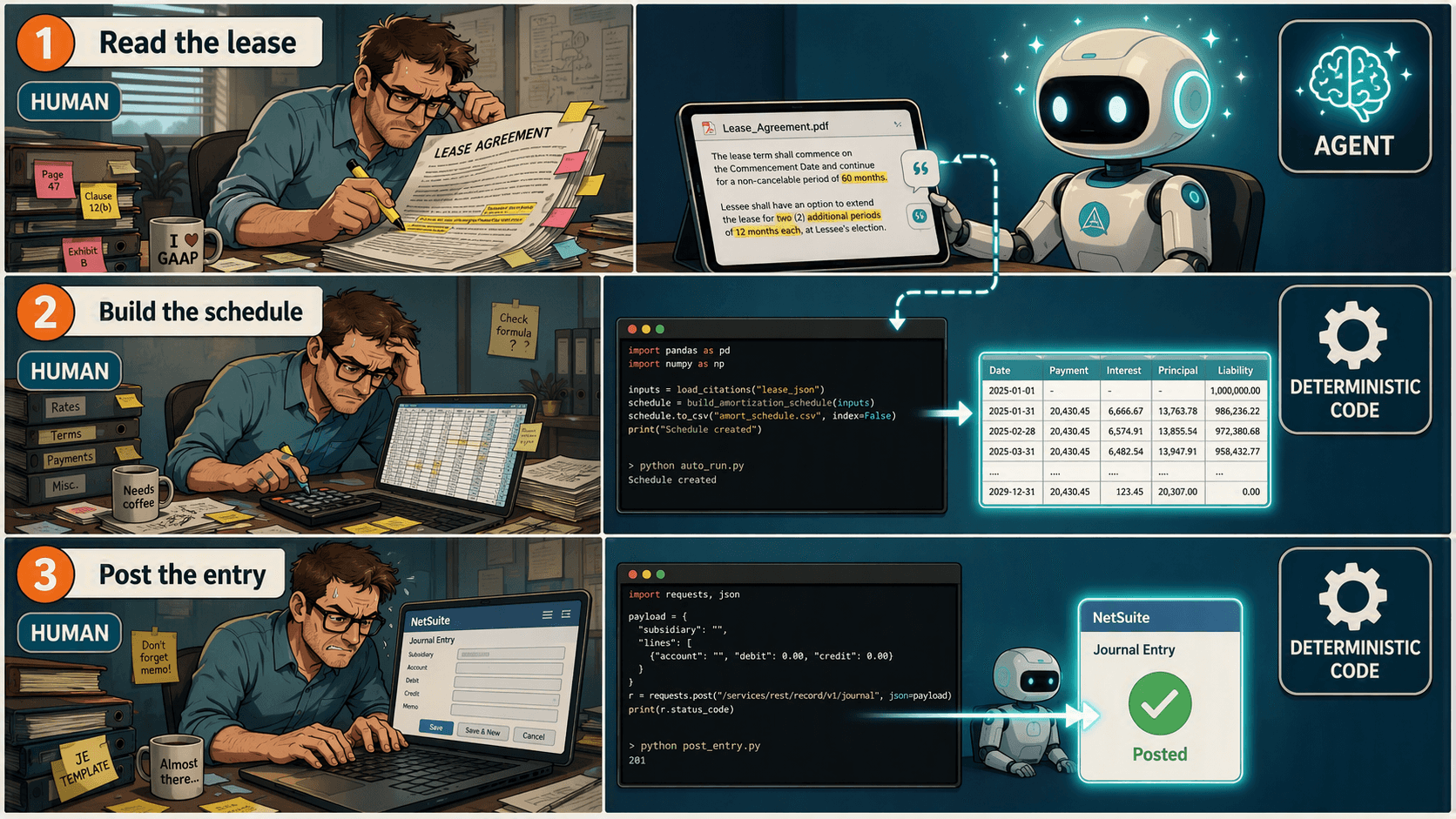
An agentic workflow is a way of using an AI model — an LLM like Claude — for more than answering a single question. Instead of one prompt, one response, the model works through a task in steps: read something, decide what matters, act on what it found, with some real autonomy over how it gets there.
That autonomy is the interesting part. It isn't the powerful part. The powerful part shows up when you stop asking the model to do the whole job and pair it with deterministic code instead — the model handles the one step that actually needs judgment, and code handles everything repeatable downstream of it: the math, the persistence, the write into whatever system runs the business. That combination is what turns a demo into an end-to-end automation instead of a chatbot that reads a document and stops.
Let's take lease accounting for example. Here's the traditional process. Read the lease. Pull the payment schedule, the free rent periods, the tenant improvement (TI) credit, the renewal options. Get an incremental borrowing rate (IBR) from a banking partner or a valuation specialist. Build a schedule that discounts the payment stream to a present value — that's your right-of-use (ROU) asset and lease liability. Roll it forward: interest accretion on the liability, straight-line amortization on the asset. Turn that schedule into a journal entry and key it into NetSuite. Repeat every month, for every lease.
None of that second half needs a person. It needs a spreadsheet formula, executed correctly, every time. The only part that ever actually needed judgment was the first part — reading the contract.
Here's the shape it takes in practice:
- Claude's API reads the lease and extracts the key provisions — payment schedule, TI credit, dates, everything downstream needs — into a JSON object.
- Code takes that JSON and runs the full ASC 842 calculation: present value, liability roll-forward, ROU amortization.
- The schedule gets written to a database, so it persists past the one-time extraction instead of living in a notebook's memory.
- Every month, a script pulls that period's amortization and interest accretion from the database, builds a journal entry object, and pushes it to NetSuite.
1. Extraction: Claude reads the lease, not a script
Extraction is the one step in ASC 842 accounting that always required a human to read the whole contract — and it's the one step a model with native PDF reading and a forced tool call can now do end to end, with a citation for every number.
The only manual inputs are the PDF and the IBR. The incremental borrowing rate is an accounting assumption, not a lease term — it still has to come from a banking partner or a valuation specialist, no agent replaces that. But "reading" the contract itself collapses into one line:
pdf_b64 = base64.standard_b64encode(PDF_PATH.read_bytes()).decode("utf-8")No OCR, no regex, no pre-chunking, no page-by-page parsing pipeline. That's the entire ingestion step — encode the bytes, hand them to the model.
The schema is where the real work happens. We built an extraction tool, record_lease_terms, and were deliberately over-descriptive about every field: what shape we want it in (payments as an array, one entry per month), what format (dates as YYYY-MM-DD), and what to do when the lease doesn't say. The TI credit field gets special treatment — it merits its own prompt, because tenant improvement dollars show up under a dozen disguises across leases, rarely under a line labeled "allowance":
TI_CREDITS_DESC = """Total tenant-improvement (TI) allowance / credit / construction budget that the landlord provides or funds for the tenant's benefit, expressed as a single signed dollar amount in the lease's stated currency.

SIGN CONVENTION: Enter as NEGATIVE if it benefits the tenant (reduces the right-of-use asset). A landlord clawback, repayment obligation, or amortized TI charged back to tenant as additional rent is entered POSITIVE. Use 0 only if the lease affirmatively states no TI allowance or rent credit is granted — do not use 0 if the lease is simply silent or the exhibit is missing; in that case return null/'not found' instead.

WHAT COUNTS AS TI — DO NOT REQUIRE THE WORD 'ALLOWANCE': Landlords fund tenant improvements under many labels. Treat ALL of the following as TI dollar amounts, even absent the word 'allowance' or 'credit':
- A cash allowance paid or credited to the tenant ('TI Allowance,' 'Improvement Allowance,' 'Construction Allowance,' 'Finish Allowance').
- A landlord-performed, landlord-funded buildout described as 'Landlord's Work,' 'Landlord's Work Letter,' or 'Base Building Work,' where Landlord designs and constructs the improvements itself rather than reimbursing the tenant. In these cases the dollar figure is often labeled a 'budget,' 'target budget,' 'not-to-exceed amount,' or 'cap on hard costs' rather than an 'allowance' — treat any such capped construction spend commitment by Landlord as the TI amount.
- A turn-key or market-ready delivery obligation where Landlord bears construction cost up to a stated ceiling.

WHERE TO LOOK — CHECK EXHIBITS, SCHEDULES, AND FOOTNOTES, NOT JUST BODY TEXT: TI dollar figures are frequently buried in an attached exhibit, in a footnote to a scope-of-work list, or in bracketed/draft-style language that nonetheless states a controlling number. Search for dollar amounts near the terms: 'budget,' 'hard costs,' 'not to exceed,' 'cap,' 'turn-key,' 'market-ready,' in addition to 'allowance' and 'credit.'

CITE the exhibit, section, and page/footnote where the figure was found."""
That description plugs straight into the tool's schema:
EXTRACTION_TOOL = {
    "name": "record_lease_terms",
    "description": "Record the financial terms extracted from the lease agreement.",
    "strict": True,
    "input_schema": {
        "type": "object",
        "additionalProperties": False,
        "properties": {
            "ti_credits": {
                "type": ["number", "null"],
                "description": TI_CREDITS_DESC,
            },
            "payments": {
                "type": "array",
                "description": (
                    "One entry per payment period (normally one per month), in chronological "
                    "order. If the lease states rent as month-ranges (e.g. 'months 1-9' or "
                    "'Lease Year 1'), expand each range into one entry per month."
                ),
                "items": {
                    "type": "object",
                    "additionalProperties": False,
                    "properties": {
                        "date": {"type": "string", "description": "Payment due date, YYYY-MM-DD."},
                        "amount": {"type": "number", "description": "Fixed/minimum monthly rent due on that date, in dollars."},
                    },
                    "required": ["date", "amount"],
                },
            },
            # stated_total_base_rent, property, citations, additional_terms follow the same pattern
        },
        "required": ["ti_credits", "payments", "stated_total_base_rent", "property", "citations", "additional_terms"],
    },
}
Configuring the agent is the easy part once the tool exists. Point it at EXTRACTION_TOOL, force tool_choice to that one tool so the response can't come back as prose that needs parsing, specify the model, and pass the lease straight in — Claude's API takes the PDF as a document content block alongside the prompt, in the same message:
with client.messages.stream(
    model=MODEL,
    max_tokens=16000,
    tools=[EXTRACTION_TOOL],
    tool_choice={"type": "tool", "name": "record_lease_terms"},
    messages=[
        {
            "role": "user",
            "content": [
                {"type": "document", "source": {"type": "base64", "media_type": "application/pdf", "data": pdf_b64}},
                {"type": "text", "text": EXTRACTION_PROMPT},
            ],
        }
    ],
) as stream:
    ...
extracted = next(b for b in final_message.content if b.type == "tool_use").input
Then a deterministic check, before any of this touches a schedule. Every extracted figure already carries a citation — page number and a short verbatim quote, so a reviewer can verify a number without re-reading the lease. On top of that, the notebook runs one hard evaluation: if the lease states a total base-rent figure anywhere, sum the extracted monthly payments and reconcile against it.
payments_total = sum(p["amount"] for p in extracted["payments"])
stated_total = extracted["stated_total_base_rent"]

if stated_total is not None:
    diff = payments_total - stated_total
    tolerance = max(1.0, 0.005 * abs(stated_total))
    status = "ok" if abs(diff) <= tolerance else "MISMATCH"
We only run this one check for simplicity — the extraction either ties out to the lease's own stated total or it gets flagged before it goes anywhere near a schedule. More assertions, or a reflection pass where the model reviews its own extraction against the source before committing to it, are the obvious next step for pushing accuracy further.
2. Scheduling: once terms are structured, it's arithmetic
Once lease terms are structured JSON, the ASC 842 amortization schedule is arithmetic, not judgment — a present value of the payment stream, a liability roll-forward, and a straight-line ROU amortization, all closed-form and all belonging in code.
| Header value | Formula |
|---|---|
| Opening lease liability | NPV(IBR/12, payments) |
| Straight-line expense | AVERAGE(payments) |
| Monthly TI amortization | ti_credits / n |
def build_schedule(ibr, ti_credits, payments):
    summary = lease_summary(ibr, ti_credits, payments)
    monthly_rate = ibr / 12
    sl_expense, ti_monthly = summary["straight_line_expense"], summary["monthly_ti_amortization"]

    rows, liability_bop = [], summary["present_value"]
    rou_bop = summary["present_value"] + ti_credits
    for period, (pay_date, amount) in enumerate(payments, start=1):
        interest = liability_bop * monthly_rate
        liability_eop = liability_bop - amount + interest
        rou_eop = rou_bop - sl_expense - ti_monthly + interest
        rows.append([period, pay_date, amount, liability_bop, -amount, interest,
                     liability_eop, rou_bop, -sl_expense, -ti_monthly, interest, rou_eop])
        liability_bop, rou_bop = liability_eop, rou_eop
    return pd.DataFrame(rows, columns=SCHEDULE_COLUMNS)
Forty lines, no ambiguity, and it self-checks: the final period's liability closes to roughly zero, which is the same sanity check a reviewer would run on an Excel amortization table. There's no reason this step should ever involve a model — the whole value of an LLM is judgment under ambiguity, and there's no ambiguity left once the terms are structured.
3. Persist: the schedule becomes a system of record, not a spreadsheet
A schedule that only exists in a spreadsheet is one accidental keystroke away from being wrong forever, with no record of what changed or when. Moving it into a database instead buys reusability and change control for free — re-run a lease and its rows get replaced, not silently overwritten in a cell nobody's watching, and anything downstream can query the current numbers without opening Excel.
We used Supabase for this. It puts a REST API in front of a Postgres database, so pushing and pulling rows from a notebook — or later, a scheduled job — is a couple of httpx calls, and the free tier is enough to run this end to end. If you want to follow along, you'll need your own Supabase project and to generate an API key.
For simplicity, table creation is a one-time step run directly in the Supabase SQL editor — a "step 0" outside the pipeline itself, not something the code does on every run:
create table if not exists public.lease_summary (
    lease_id                text primary key,
    ibr                     numeric,
    total_payments          numeric,
    present_value           numeric,
    straight_line_expense   numeric,
    ti_credits              numeric,
    monthly_ti_amortization numeric,
    inserted_at             timestamptz default now()
);

create table if not exists public.lease_schedule (
    lease_id                text not null references public.lease_summary(lease_id) on delete cascade,
    period                  int  not null,
    date                    date,
    lease_payment           numeric,
    liability_bop           numeric,
    payment                 numeric,
    interest                numeric,
    liability_eop           numeric,
    rou_bop                 numeric,
    straight_line_expense   numeric,
    ti_net_of_amortization  numeric,
    interest_rou            numeric,
    rua_eop                 numeric,
    primary key (lease_id, period)
);
That's the header table and the per-period detail table, keyed by lease_id. Everything the pipeline writes after this point is a regular insert against tables that already exist.
4. Post: fetch, transform, push — the same script every month
Posting the journal entry is a separate job from extraction and scheduling entirely. It runs every month, reads only from the database, and never touches a PDF or a model.
First, it fetches the period's figures for every lease with activity that month:
def fetch_lease_entries_from_supabase(as_of_date):
    d = datetime.strptime(as_of_date, "%Y-%m-%d").date()
    month_start = d.replace(day=1)
    next_month = (month_start.replace(day=28) + timedelta(days=7)).replace(day=1)
    query = [
        ("select", "lease_id,date,straight_line_expense,ti_net_of_amortization,interest"),
        ("date", f"gte.{month_start.isoformat()}"),
        ("date", f"lt.{next_month.isoformat()}"),
        ("order", "lease_id"),
    ]
    with httpx.Client(timeout=30) as db:
        rows = db.get(f"{REST}/{SCHEDULE_TABLE}", headers=DB_HEADERS, params=query).json()

    entries = []
    for r in rows:
        lease_expense = round(-(float(r["straight_line_expense"]) + float(r["ti_net_of_amortization"])), 2)
        interest = round(float(r["interest"]), 2)
        entries.append({"lease_id": r["lease_id"], "date": r["date"],
                        "lease_expense": lease_expense, "interest": interest})
    return entries
Then it transforms those rows into a journal entry object and pushes it to NetSuite:
def prepare_journal_entry(lease_entries, as_of_date, posting_period, posting_period_id):
    lines = []
    for e in lease_entries:
        entity = {"id": ns["entity_id"], "refName": ns["entity_name"]}
        lines.append({"account": ACCOUNTS["rent_expense"], "debit": e["lease_expense"], "entity": entity, ...})
        lines.append({"account": ACCOUNTS["rou_asset"], "credit": e["lease_expense"], "entity": entity, ...})
        lines.append({"account": ACCOUNTS["rou_asset"], "debit": e["interest"], "entity": entity, ...})
        lines.append({"account": ACCOUNTS["lease_liability"], "credit": e["interest"], "entity": entity, ...})
    return {"line": {"items": lines}, "postingPeriod": {"id": str(posting_period_id)}, ...}
Four lines per lease, every month: debit rent expense / credit ROU asset for the periodic cost, debit ROU asset / credit lease liability for interest accretion. That payload is a straight POST to NetSuite's journalentry REST endpoint, authenticated with OAuth1 — the same pattern you'd use for any programmatic NetSuite write.
Because this step needs nothing but a date and a database connection, it doesn't belong in a notebook someone has to remember to run. It's a natural fit for a scheduled GitHub Action — fire it on a cron trigger on close day, or run it on demand, and the same script posts the entry without anyone opening a notebook. That's the same shift we walked through in moving from vibe coding to controlled automation.
FAQ
Q: Does this replace lease accounting software like LeaseQuery or Visual Lease? Not necessarily. For a small portfolio it can replace dedicated lease software outright. For a larger one, it's the ingestion layer — it replaces the manual abstraction step, and you can still push the finished schedule into whatever lease system you already run.
Q: What stops the model from silently getting a number wrong on an amendment-heavy lease?
The forced tool schema, a citation for every extracted figure, and a reconciliation check against any total the lease itself states. Missing data comes back as null, never a guessed 0, so a silent gap is visible instead of absorbed into the schedule.
Q: Do I need Supabase specifically?
No. Supabase is a convenient choice because it fronts a Postgres database with a REST API and has a free tier, but the pattern is generic: a header table and a detail table, keyed by lease_id, that a re-run replaces rather than duplicates. Swap in Postgres, Snowflake, or whatever store you already run.
Q: Do I need to babysit this every month? No. Splitting persistence from posting is what makes that possible — posting reads only from the database, with no PDF and no model involved, so there's nothing stopping it from running unattended on a schedule instead of from a notebook you open by hand. See moving from vibe coding to controlled automation for how we've set that up elsewhere.
Q: How much engineering does this take to build? Less than you'd expect. The extraction notebook is a few hundred lines including the schema; the schedule builder is about 40 lines of pandas; persisting to Supabase is a couple of REST calls; the NetSuite poster is another REST call with OAuth1. If you're comfortable with Python and REST APIs, you can build this.
Want to give it a shot? Both notebooks — extraction with citations, the ASC 842 schedule builder, and the NetSuite poster — are in the theaccountantthatcodes GitHub repo, along with a mocked lease contract so you can run the whole pipeline end to end without needing a real lease on hand.
The reading was always the expensive part, and it's the part that just moved. The arithmetic was never the hard part — it was just the part nobody had gotten around to automating, because it was tangled up with the reading. Separate the two, and lease accounting stops being a manual close task and becomes a pipeline: an agent that reads once per lease, and code that runs the same way every month.
As a CPA and Controller who has built this kind of pipeline in production, I'll take a database and a scheduled script over a notebook I have to remember to run every month — that's the difference between an automation and a really good demo.
Last updated: August 2026.